
Square Footage Best Practices
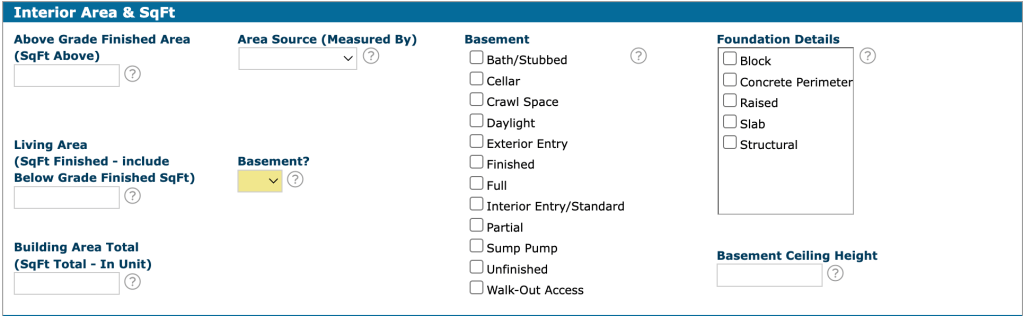
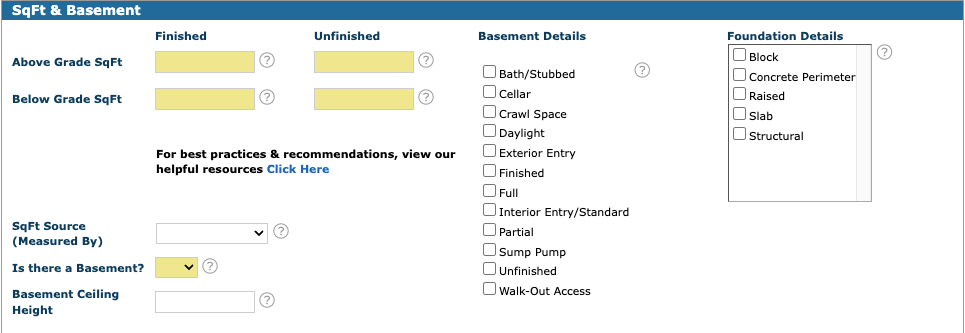
Square footage in Matrix is now entered in four fields: above grade finished, above grade unfinished, below grade finished, and below grade unfinished. Enter a value in each field, using zero when one doesn’t apply, and Matrix will calculate the totals automatically. The “Fill from Realist” option will no longer be available for square footage input fields only, so these values must be entered manually. For existing listings, you’ll be prompted to complete these fields the next time you make a change.
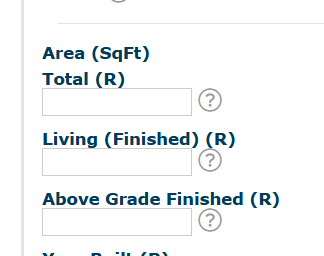
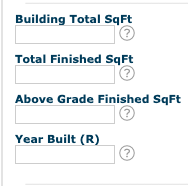
Here’s a comparison of the previous and new layouts:
Previous layout:
New layout:
Basement Details
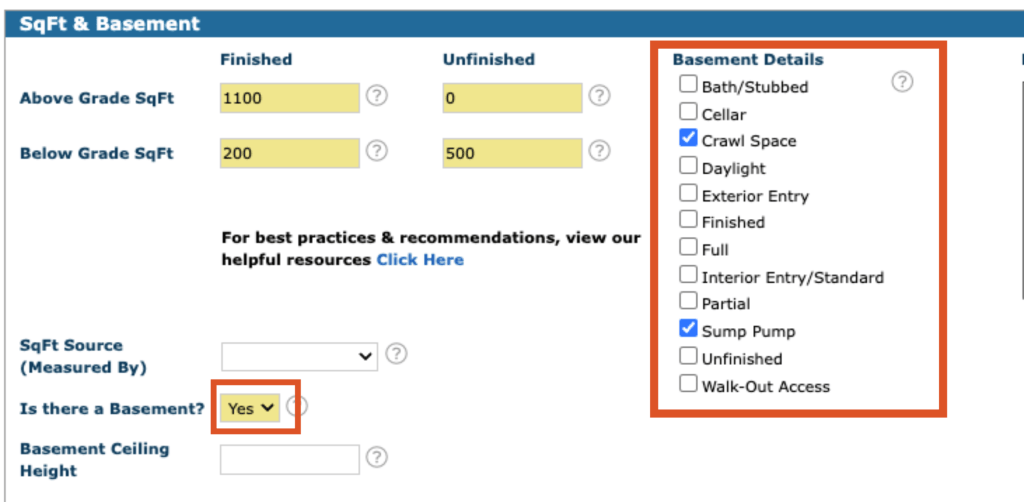
If any options are selected under Basement Details, the “Is there a Basement?” field must be set to “Yes.” This ensures the basement information is accurately reflected in the listing.
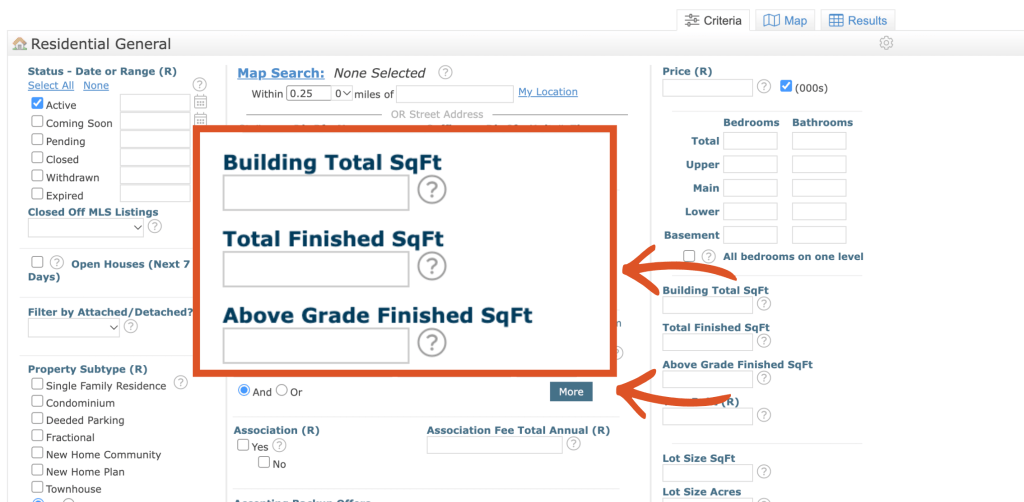
Search Fields
The square footage search fields have been renamed to align with the new total square footage fields, ensuring consistency throughout Matrix.
Video Links
Matrix Square Footage Updates: A Quick Overview
Appraiser’s Guide on Matrix Square Footage Updates
Square Footage Definitions
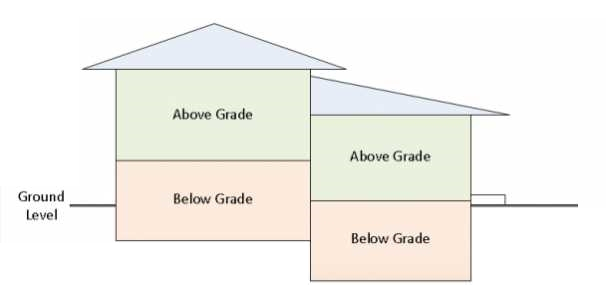
- Grade: The ground level established around the exterior perimeter of a main structure’s finished surface that determines whether a space is considered above-grade or below-grade. The determination of whether a space is Above Grade or Below Grade is based on the space’s elevation relative to the established Grade—not on whether the room has windows, a walk-out door, or otherwise appears to be a basement.
- Above Grade: The main levels of the structure that are entirely above Grade. (excludes lower levels, basements, decks and garages).
- Below Grade: Levels within the main structure that are wholly or partially below Grade. A floor level is considered wholly or partially below Grade when any portion of its exterior walls is below Grade.
- Finished Area: An enclosed area within the main structure that is suitable for year-round occupancy and is substantially finished, including finished walls, floors, and ceilings, and is equipped with a permanent heat source.
- Unfinished Area: An enclosed area within the main structure that is not considered Finished Area because it lacks one or more required characteristics, such as comparable finished walls, floors, ceilings, or a permanent heat source. (e.g. unfinished basements, raw storage areas, and other unfinished spaces)
- Basement: The lowest level of a main structure that rests on a below Grade foundation (e.g., cellar, standard, walk-out and garden level). Basement square footage is prohibited from inclusion in the Above Grade Finished Sqft field.
Square Footage Fields
- Above Grade Finished SqFt | Previously: Above Grade Finished Area
- User-entered | Required
- Finished square footage located entirely above ground level. Excludes garages, non-year-round spaces, and areas not connected to the main house by finished space.
- Above Grade Unfinished SqFt | Previously: Above Grade Unfinished Area
- User-entered | Required
- Unfinished square footage located entirely above ground level.
- Below Grade Finished SqFt | Previously: Below Grade Finished Area
- User-entered | Required
- Finished square footage located fully or partially below ground level. Excludes garages, non-year-round spaces, and areas not connected to the main house by finished space.
- Below Grade Unfinished SqFt | Previously: Below Grade Unfinished Area
- User-entered | Required
- Unfinished square footage on levels wholly or partially below grade that does not meet finished living space standards.
- Above Grade Total SqFt | Previously: Above Grade TotalArea
- Derived | Not editable
- Total of Above Grade Finished SqFt + Above Grade Unfinished SqFt.
- Total Finished SqFt | Previously: Living Area
- Derived | Not editable
- Total finished, livable square footage, automatically calculated from above and below grade finished areas
- Above Grade Finished SqFt + Below Grade Finished SqFt
- Building Total SqFt | Previously: Building Area Total
- Derived | Not editable
- Total square footage, automatically calculated from all finished and unfinished areas above and below grade.
- Above Grade Finished SqFt + Above Grade Unfinished SqFt + Below Grade Finished SqFt + Below Grade Unfinished SqFt
Frequently Asked Questions
Matrix Listing Input will now separate finished and unfinished square footage above and below grade. When entering a new listing, you’ll need to provide a value in all four fields. Enter (0) when a field does not apply to the property. Matrix will calculate the total square footage based on the values entered.
The previous Matrix square-footage fields did not allow all square-footage information to be exported as individual data fields. The new fields allow finished and unfinished square footage above and below grade to be entered and exported separately, providing more complete and structured square-footage data.
The update also better supports the way square-footage information is used in appraisal-related reporting and helps align MLS data with current industry standards.
The updated fields provide a more specific breakdown of square footage, making the information entered into the MLS more complete and structured. This improves the consistency and data integrity of the MLS and provides more detailed square-footage information that can be used across MLS and appraisal-related reporting.
We understand that entering (0) in a field that does not apply to the property may seem unnecessary. However, all four square-footage fields require a numerical value so the system can calculate the totals correctly and export the data. If a type of square footage does not apply to the property, enter 0 to indicate that there is no square footage for that field.
Existing listings were entered using the previous square-footage fields, so the new four-field breakdown is not available for those listings. Because the square footage could not be automatically updated for all existing listings, any listing that was in the system before the square-footage change will need to have the new fields completed. This applies to listings in Coming Soon, Active, Pending, and Withdrawn status. The appropriate square-footage fields must be completed before making a listing or status change.
Yes, but the impact is minimal. The “Living” field will now appear as “Total Finished SqFt” in searches and search displays.
Previous Search Fields:
New Search Fields:
No. This change does not impact or change the listing statistics or metrics provided by Matrix.